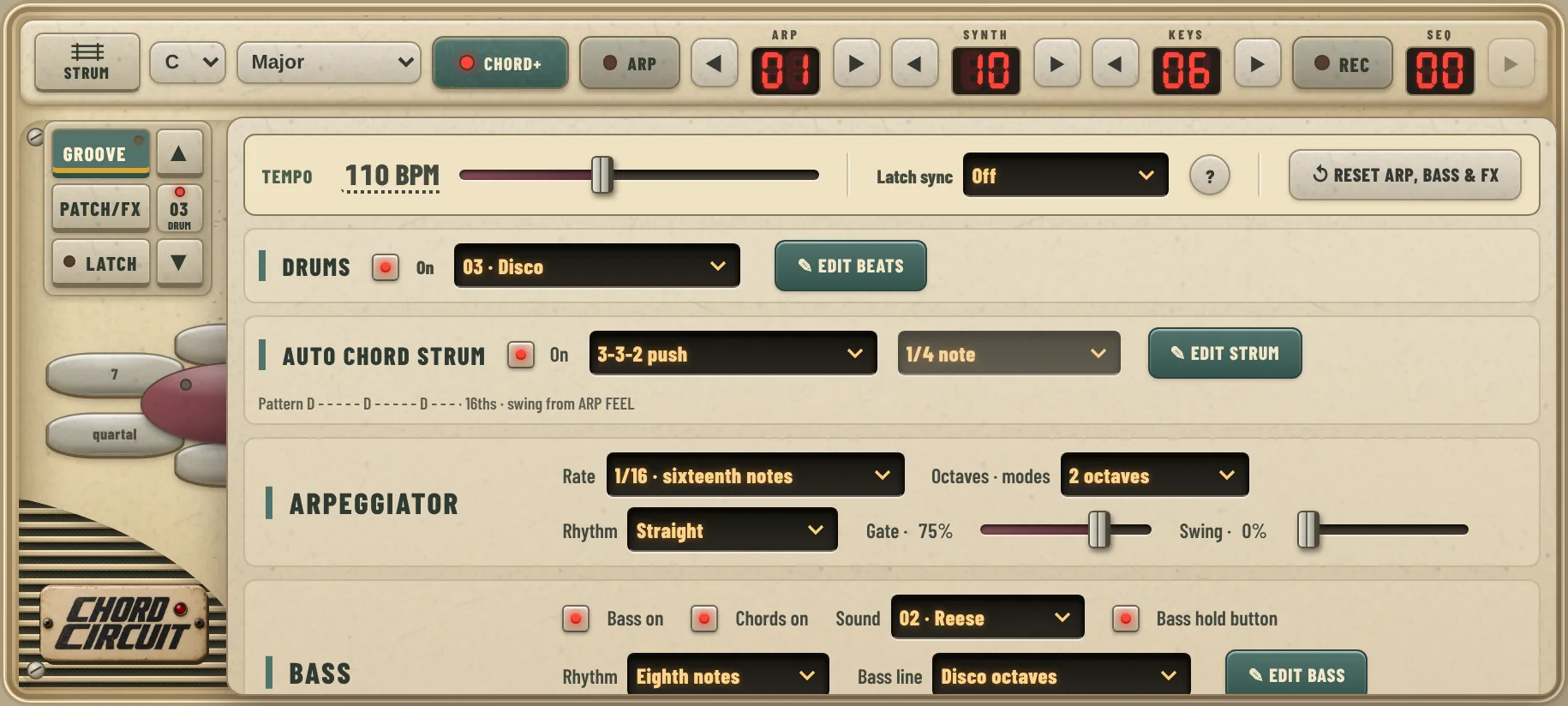
Tempo & latch sync
Everything on the Groove page plays to one shared clock, so drums, strums, arp and bass always stay together.
Tempo
Drag the Tempo slider (40–220 BPM), or tap the BPM number to type an exact tempo.
BPM means beats per minute. Around 70–90 feels relaxed, 100–120 is pop and dance, and 125+ is energetic.
Latch sync
With Latch on, this decides when your next chord starts:
- Off: the moment you tap.
- ⅛ note / ¼ note: on the next eighth note or beat.
- ½ note: on beat 1 or beat 3.
- Whole note: on the next bar, the "1".
↺ Reset arp, bass & FX puts those settings back to how the app starts, if you get lost.
Drums
Turn on Drums and pick a beat. You can also control drums from the main screen: ▲ ▼ next to the drum number changes the beat, tapping the number turns drums on and off, and holding it opens the drum editor.
There are ten beats, covering four kinds of music:
Every beat works at any tempo. Slow, relaxed beats sit well around 70–95 BPM, and dance beats around 110–126.
Auto chord strum
Turn on Auto chord strum and Chord Circuit strums your chord in a rhythm while you hold or latch it. The patterns are modelled on how real guitarists and pianists play: some hit the bass note first, some only use the upper strings.
- The rate menu (1/8 note, 1/4 note, triplets…) sets how fast the pattern steps.
- Auto strum uses the chord strum speed and strum order from the Chords section below it, so a slower strum sounds more like a real guitar.
- The line under the menus shows the pattern, for example
D - - - - - D - - - - - D - - -. Swing comes from the arpeggiator's Swing slider.
The arpeggiator
Turn on Arp at the top of the screen, and ◀ ▶ next to it picks one of 50 patterns, from simple up and down runs to 16-step phrases across three octaves. The arpeggiator plays your chord one note at a time instead of all at once. The settings live on the Groove page.
| Setting | What it does |
|---|---|
| Rate | How fast the notes come: from ¼ notes to ⅟₁₆ and ⅟₃₂ notes, triplets and dotted eighths. 1/64 · chip flutter gives a fast 8-bit shimmer. |
| Octaves · modes | 1, 2 or 3 octaves. More octaves means the pattern climbs higher before it repeats. |
| Rhythm | Straight plays every step. With rests · 8 steps leaves gaps for a bouncier rhythm. |
| Gate | How long each note lasts. Low is short and plucky, high is smooth and legato. |
| Swing | Pushes every second note later for a shuffle feel. It also swings the auto strum. |
Bass
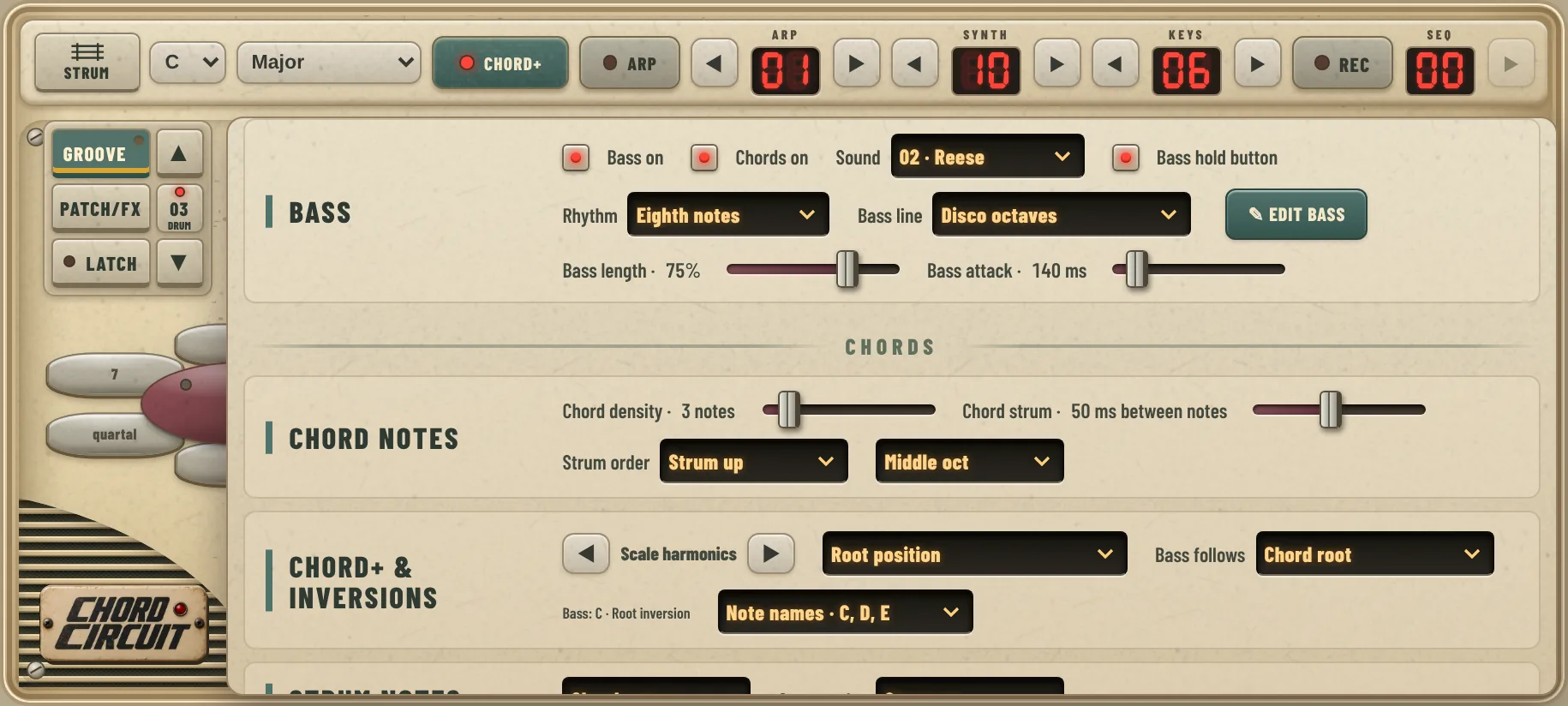
The bass follows every chord change by itself. Choose a sound, a rhythm and a bass line.
- Bass on switches the bass on and off.
- Chords on: turn it off to hear only bass and drums, with no synth chords. Great for practising or for a stripped-down part.
- Sound: eight basses, from a deep, soft sub and a booming 808 to 80s analog, acid and 8-bit.
- Bass length sets how long each note rings, and Bass attack how softly it starts.
- Set the bass volume in Mix on the main screen.
Rhythm
Held · whole chord plays one long note per chord. Whole, half, quarter, eighth and 16th notes repeat it in time. Offbeat 8ths plays between the beats, as in house music, and Follow arp plays along with the arpeggiator.
Bass lines: chord tones
These repeat a short pattern of notes from the chord, using the rhythm you picked above. The numbers are the notes of the chord:
The patterns range from simple root and fifth, or octave jumps, to longer lines that walk up and down the whole chord.
Bass lines: grooves
Grooves are complete one-bar bass parts with their own rhythm and note lengths. They lock to the bar, so they ignore the Rhythm menu and always land the same way against the drums.
Bass hold
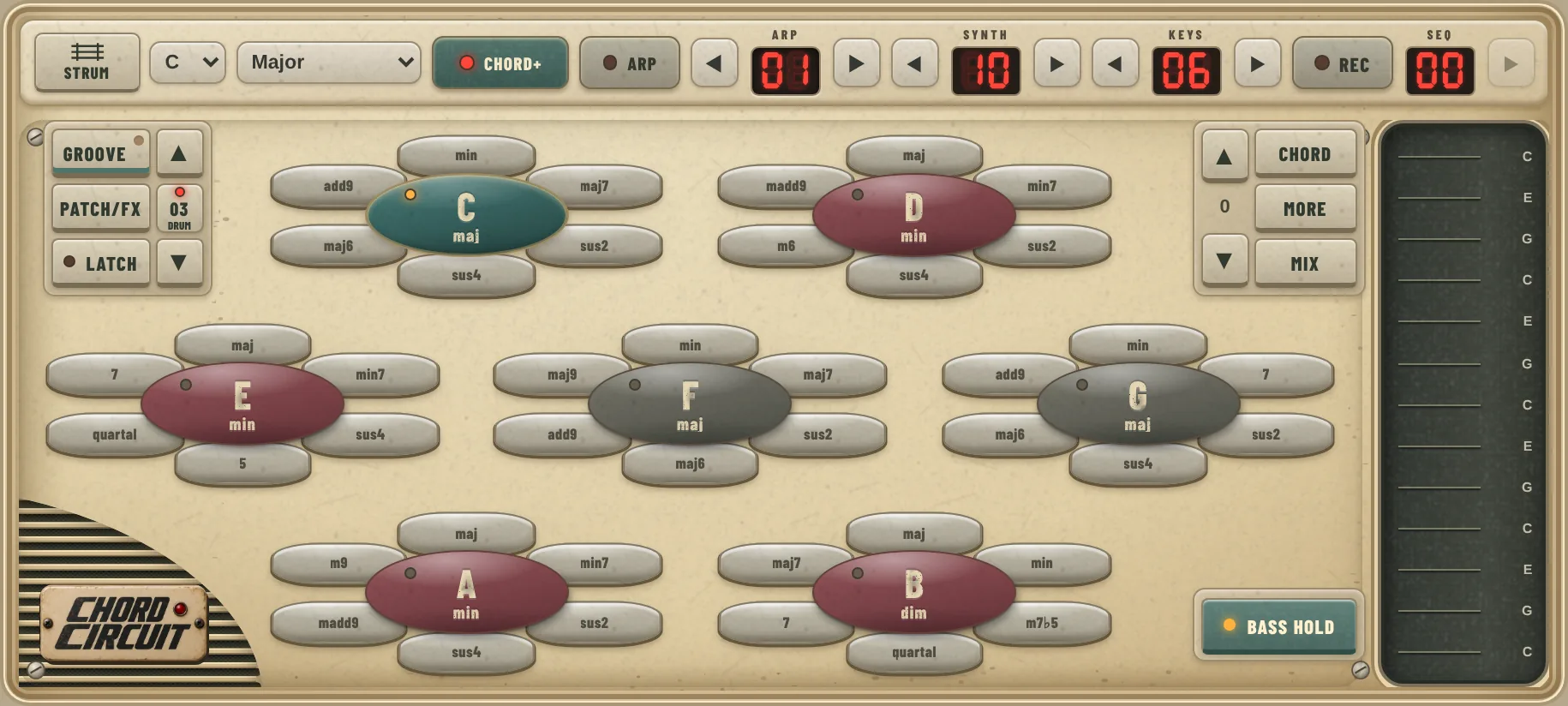
Keep the bass on one chord while the chords above it change. Musicians call this a pedal note. It builds tension and is perfect for intros and build-ups.
- In Groove → Bass, turn on Bass hold button. A Bass hold button appears on the main screen under Mix.
- Play a chord with bass on.
- Hold Bass hold with one finger. It lights up.
- Play other chords with your other hand. Synth, keys and strums follow the new chords, but the bass stays where it was.
- Let go, and the bass moves to the current chord on its next note.
The button is hidden in piano view.
In the sequencer
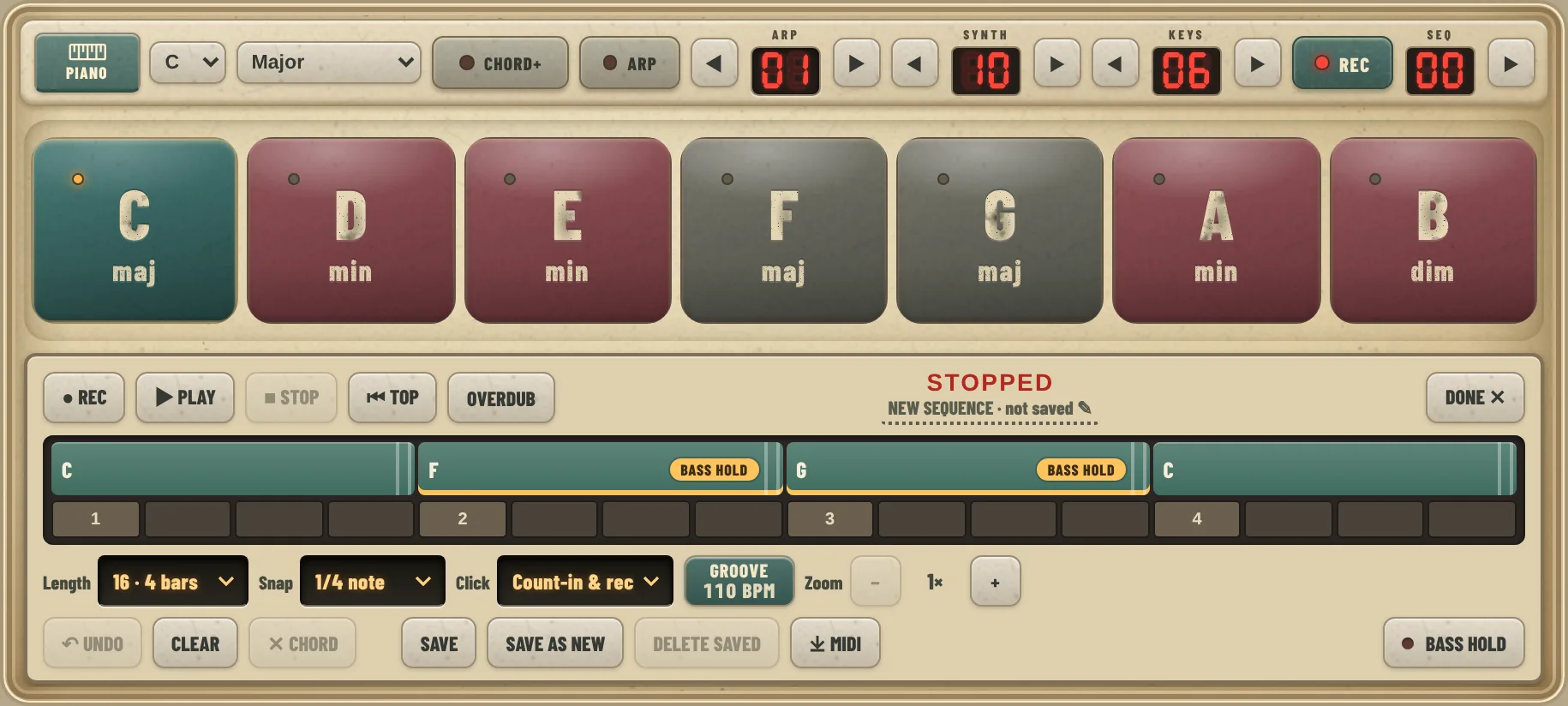
The sequencer gets its own Bass hold button at the end of the bottom row. Hold it while you drag a chord onto the timeline, and that chord gets an amber BASS HOLD tag. When the sequence plays, a tagged chord keeps the bass of the chord before it, until the next untagged chord.
- Several tagged chords in a row all keep the same bass.
- Moving or resizing a tagged chord keeps its tag. To remove it, drag the chord in again without holding the button.
- The tags are saved with your sequence.
Beat, bass and strum editors
Each part has its own editor: ✎ Edit beats, ✎ Edit bass and ✎ Edit strum. They all work the same way, and the round ? in each editor shows a quick how-to.
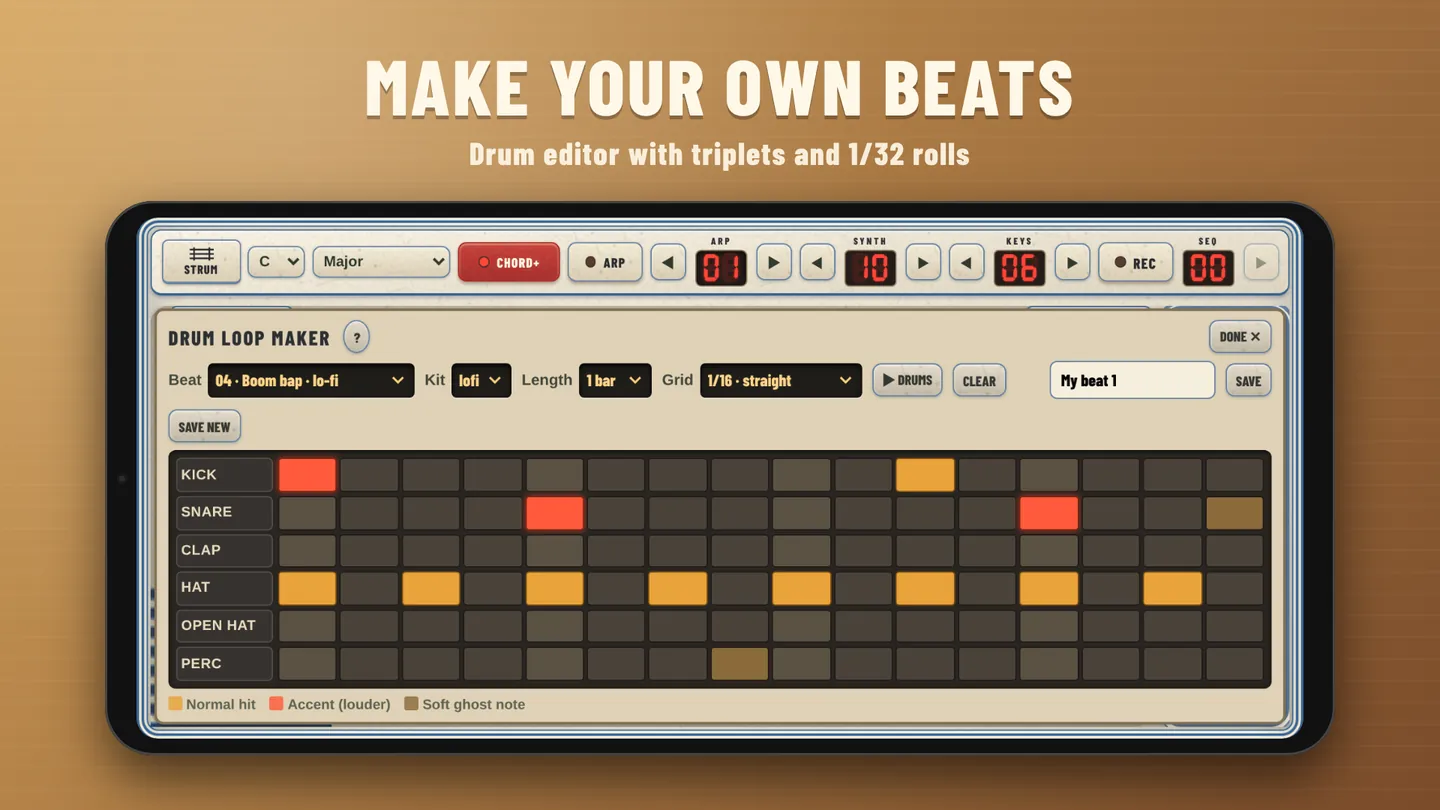
Drums
Tap a step: off → normal → accent. Drag along a row to paint hats fast. Grids go from straight 16ths to triplets and 1/32 rolls.
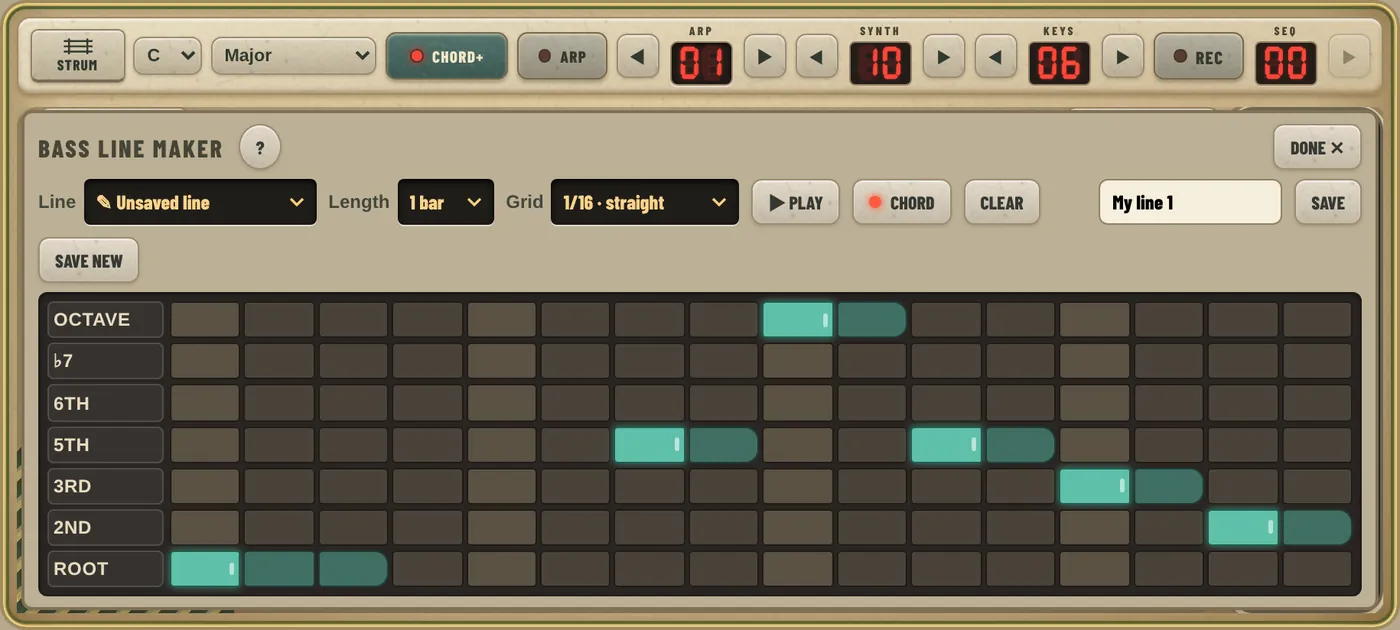
Bass
Rows are chord notes (Root, 3rd, 5th…), so your line follows any chord. Drag a note sideways to set its length.
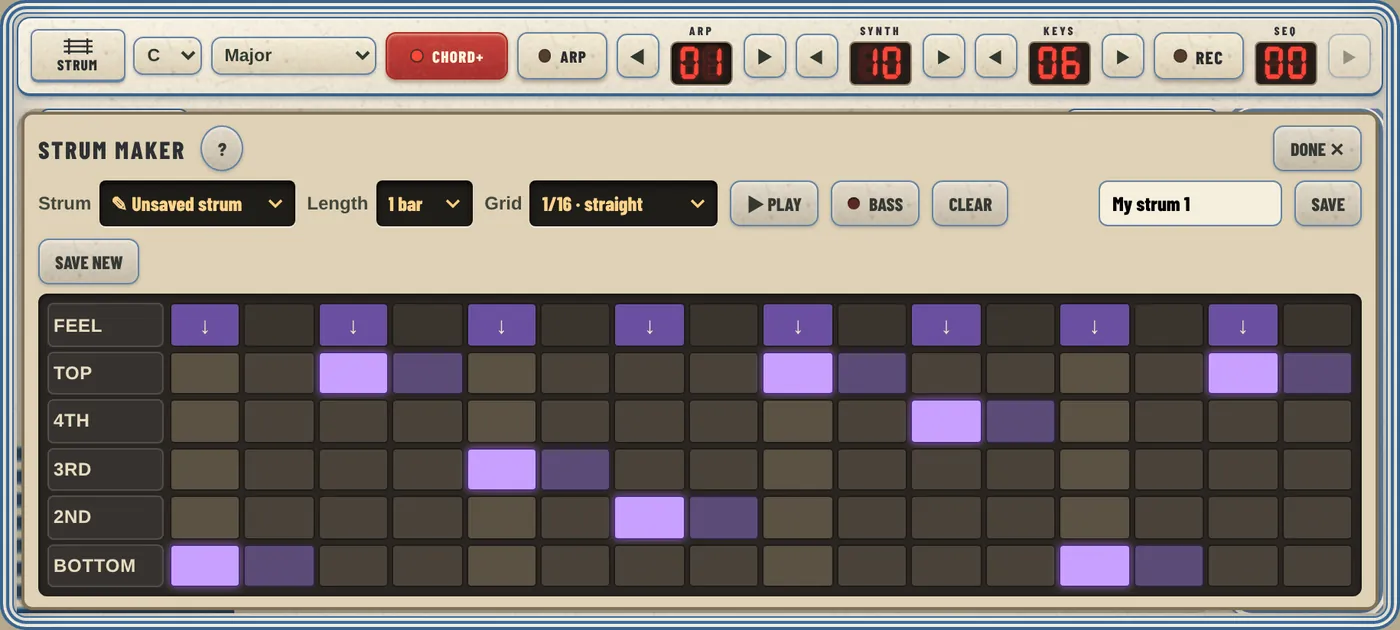
Strums
Pick exactly which notes of the chord to strum on each step (bottom, 2nd, 3rd, 4th or top), and set the feel: ↓ down, ↑ up, accent or short. Every built-in strum opens here too, so pick one that is close and make it yours.
Ready-made grooves
Set these up, turn on Latch and play the chords. They're starting points: change one thing at a time and listen to what it does.
Night drive
80s synthwave, neon and empty roads.
- Key
- A · Natural minor, 104 BPM
- Drums
- 01 · Synthwave
- Bass
- 05 · 80s Analog, Eighth notes, Off · single note
- Arp
- On, 1/8. dotted eighths, 2 octaves
- FX
- FX preset Synthwave
- Chords
- Am → F → C → G
Disco floor
Octave bass and choppy guitar.
- Key
- A · Natural minor, 118 BPM
- Drums
- 03 · Disco
- Bass
- 07 · Digital Slap, groove Disco octaves
- Strum
- Auto strum on, Funk 16ths
- Chords
- Am → Dm → G → C
Study beats
Warm, slow lo-fi with jazzy chords.
- Key
- C · Major, 78 BPM
- Drums
- 05 · Lo-fi chill
- Bass
- 01 · Sine sub, groove Walking · 1 2 3 5
- Strum
- Auto strum on, Half-time ballad, Swing 20%
- FX
- FX preset Lo-fi tape
- Chords
- With Chord+: Fmaj7 → Em7 → Dm7 → Cmaj7
Campfire
Strummed folk with a country bass.
- Key
- G · Major, 96 BPM
- Drums
- Off, or 09 · Rock for a full band
- Bass
- 01 · Sine sub, groove Two-beat country
- Strum
- Auto strum on, Folk · bass, D DU UDU
- Chords
- G → D → Em → C
The build-up 1.4
A pedal note that pulls back home.
- Key
- C · Major, 120 BPM
- Drums
- 02 · House
- Bass
- 04 · 808, Eighth notes
- Hold
- Play C, hold Bass hold, then F → G
- Release
- Let go as you land back on C
Groove questions
The arp or auto strum doesn't start
They play while a chord is held or latched. Check that they are switched on, and that Chords on is on in the bass section.
My chord changes come late
That's Latch sync waiting for the beat. Tap a little earlier, choose a shorter value like ⅛ note, or set it to Off.
The bass line ignores the Rhythm menu
That's right for grooves: they have their own rhythm locked to the bar. The Rhythm menu works with the chord-tone patterns and with Off · single note.
The bass is too loud or too quiet
Open Mix on the main screen and move the Bass fader. A softer sound like 01 · Sine sub also sits lower in the mix.
I can't find the Bass hold button
Turn on Bass hold button in Groove → Bass. It needs version 1.4 or newer, and it isn't shown in piano view. The version number is at the bottom of the Groove page.